

The perfect recruitment website needs to provide the information your website visitors need, whilst portraying your brand to your visitors. Your visitors need to know who you are and what you do immediately, then be able to navigate to their next page easily.
Step 1, Understanding your recruitment website target market
Who exactly will be visiting your website? Most recruiter website will have two distinct users;
- Candidates – those looking for a job
- Clients – those wanting to fill a job
Candidates need to know if your recruitment company hire within their industry and if so, view a list of available jobs. They may also want to submit their info to you for when a job becomes available or find a list of job finding resources, such as info on how to present themselves at interview.
Clients need convincing that your recruitment company will find them the best candidates. Once they are satisfied, provide an easy form of contact to begin the onboarding process.
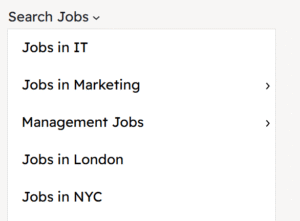
Step 2, Clear navigation
Research shows that visitors stay longer if they find a clear navigation route throughout your website. Make your primary navigation easy to find and use. Also use obvious calls to action, such as ‘view our current jobs’ and in text links to repeat navigation when the visitor needs it.
Often websites have more pages than you can fit into a navigation bar, consider categorising your navigation and place further links under a drop down menu.
Link shortcuts are also heavily used in a recruitment website, take the job search for example. Place a high level ‘Search Jobs’ link in the menu, hover over to this to reveal more links direct to filtered results, such as jobs in a certain sector or location.
Step 3, Job Search
It might sound obvious, but promoting your jobs is key. Not only are you showing candidates jobs you have available, you are showing clients that you are filling jobs similar to what they have available.
These jobs can also be submitted to other job boards for additional visibility, such as Indeed or Google Jobs.
Smart recruiters use products such as our Job Board Plugin to automatically populate their job boards directly from their recruitment CRM. Jobs are added and removed directly reflecting their CRM data, providing an up to the minute job board with zero effort.
Step 4, Ease of Contact
Providing clear contact methods for your target users encourages them to get in contact. Provide a mixture of contact methods, from telephone, to address to social media and contact forms. Typical contact forms on a recruitment website include;
- Main Contact Form
- Job Application Form
- Registration Form
- Submit CV Form
- Manage My Info Form
These days, contact info can be linked. For example an telephone number should be linked allowing the visitor to click it to open their phone app or Whatsapp can open a call or message window directly in WhatsApp app or WhatsApp browser mode.
Step 5, Provide Useful Info
Most recruiters provide additional info mostly for the benefit of search engines. Whilst these pages do provide SEO benefit, their benefit goes way beyond just SEO.
Giving tips or useful insights show a potential candidate or client that you know your stuff, building confidence in your company. Take this a step further a feature a news or blog area, discussing recent topics can present you as a thought leader in your specialism. This then opens many more doors for further promotion such as being featured within another publication.
Candidates armed with info on how to present themselves during an interview will leave a better impression, making clients happier with the standard of candidates you present.
This useful info can be provided freely on your website, or be available to logged in users only, to entice sign ups. Remember though, if you provide info behind a login, search engines won’t find your content which will lose SEO benefit these pages could bring.
Step 6, Testimonials, Case Studies, Reviews
You know your recruitment company is great, your past and existing customers know you are great, but how do you let potential customers know that you are great?
Displaying legitimate testimonials, ideally traceable if any visitors want to validate it show that you have happy customers. Politely ask your customers to quickly write a short note about you, not all will oblige but some are happy to. Display these proudly on your website.
Case Studies provide promotion for your recruitment business and the client, and can be written with keyword rich content so make perfect pages on your website. Discuss popular topics to make the case study relatable to your target audience. “How we recruited a CEO for a Leading Tech Firm” for example, discuss the needs of the project, how you met those needs and how the new hire you placed enhanced the client.
Step 7, SEO
We’ve touched on this in previous steps, SEO will bring more candidates and clients to your website.
Effective SEO will not only bring more visitors, but targeted visitors. There is no use attracting 1m visitors if they don’t care about your product/service. But gaining visitors who fi your target market perfectly result in more candidate registrations, more applications and more clients.
There you have it, our 7 top tips on creating the perfect recruitment website. Whether you use our own recruitment website design and build services or another company, keep these in mind to get the most out of your website.
If you’d like a quote to create a new website or refresh your existing site, do contact us and we’ll get right back to you.